
A Mac storage cleaner with a way back for your files
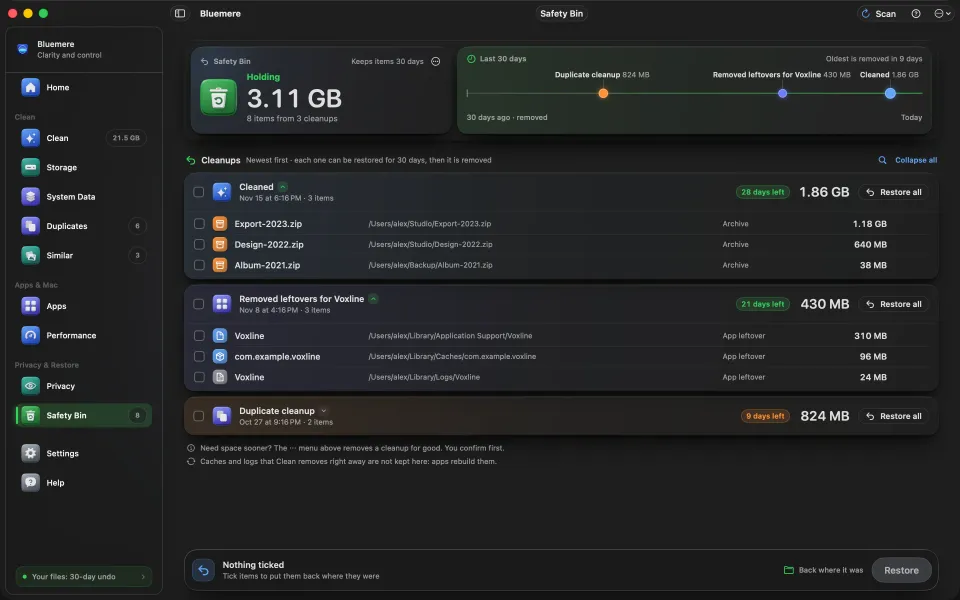
Bluemere will show what is filling your Mac’s disk and help you free space. Your own files will go to the Safety Bin first, where you can restore them for 7, 14 or 30 days. And Bluemere will have no internet access at all.
A short email is all it takes—we’ll write once when it launches. No newsletter. Privacy notice
At a glance
- Days to restore your own files—or 7 or 14, as you choose
- 30
- Languages in the app
- 10
- Internet connections: no network permission
- 0
- Accounts you’ll need to create
- 0
Everything that matters, thought through
For Mac users who want to see where their disk space went and free it up with a way back for their own files.
See where the space went
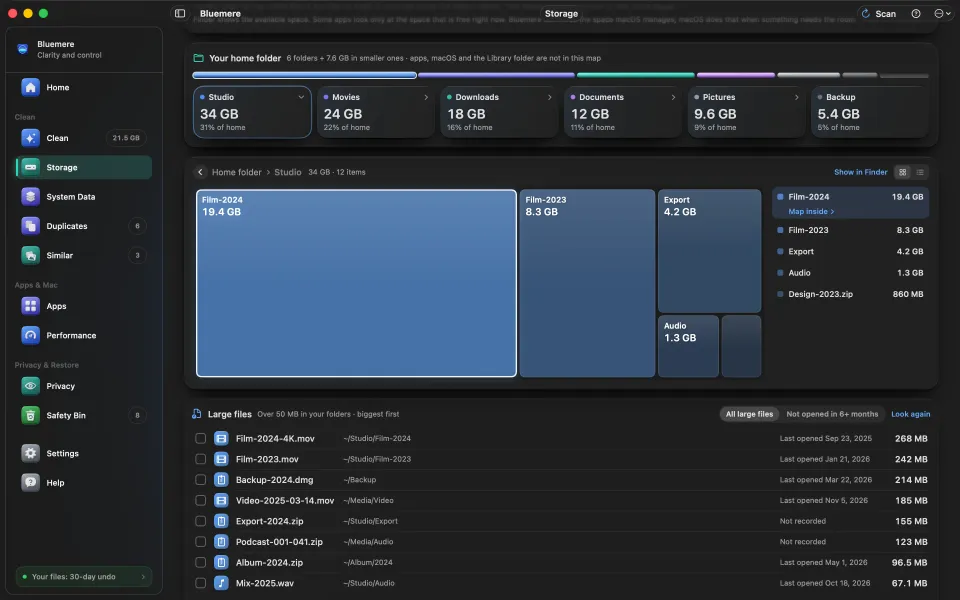
Bluemere will draw a storage map of your folders and list your largest files, with the date you last opened each one. You’ll be able to tick files right in the map and move them to the Safety Bin.
Clean with a way back
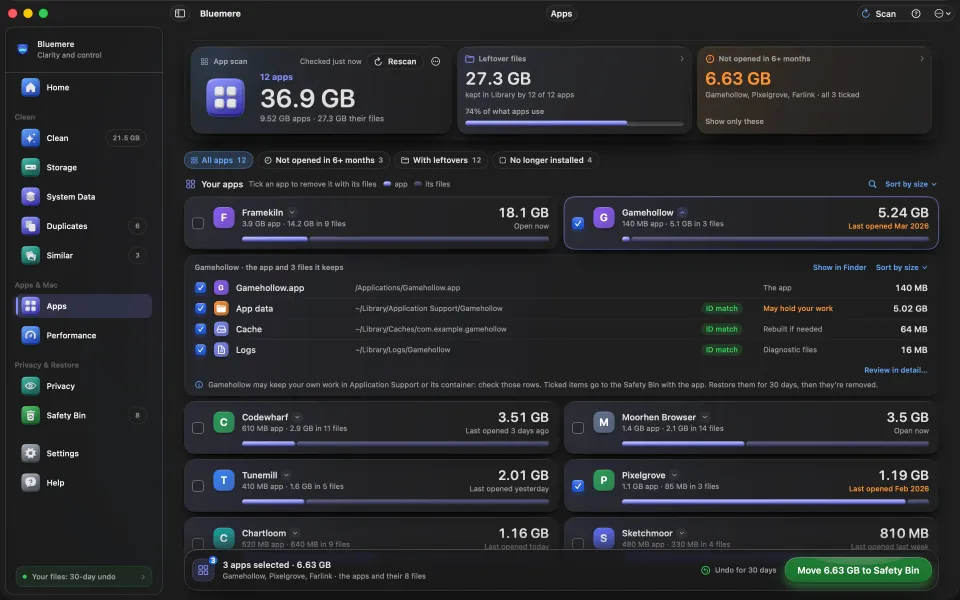
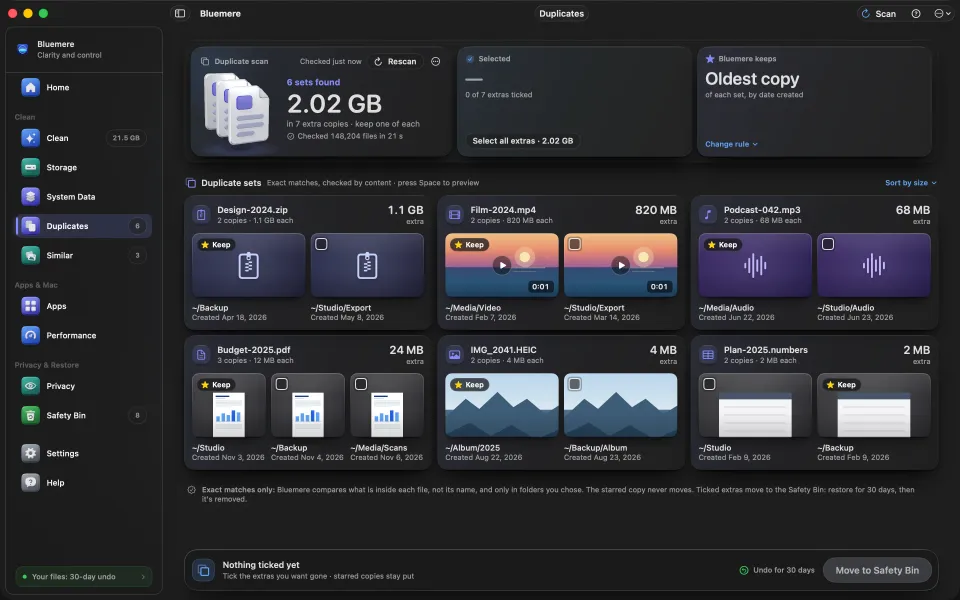
Duplicates, large files, similar photos, uninstalled apps and their leftovers will move to the Safety Bin. From there you’ll be able to restore them to the same place for 7, 14 or 30 days.
Safe or Review first, with a reason
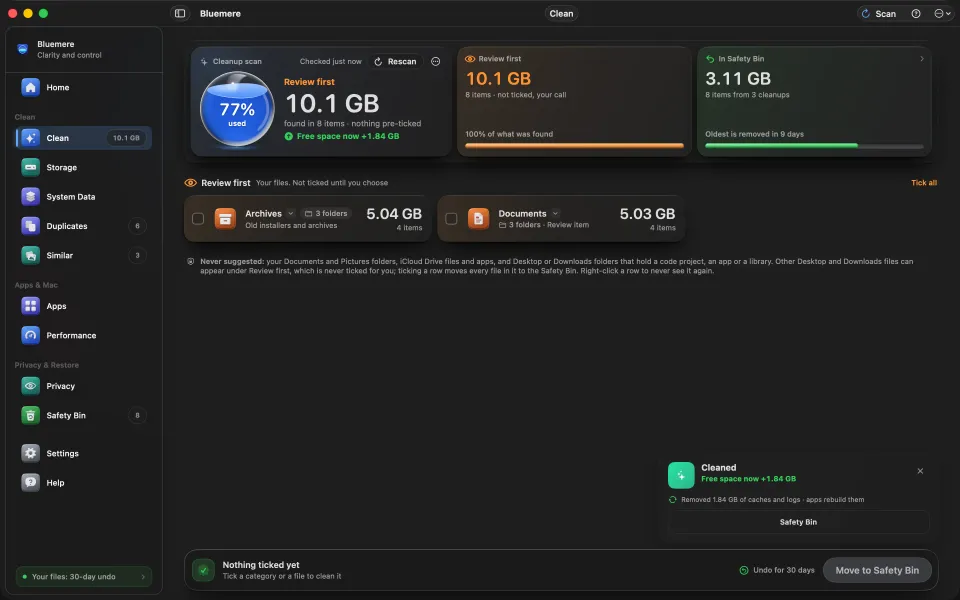
Every suggestion will be marked Safe or Review first, with a reason. Caches and logs that apps rebuild will be removed only after one confirmation that says so. Caches of open apps, and caches in use right now, will be skipped.
System Data, explained
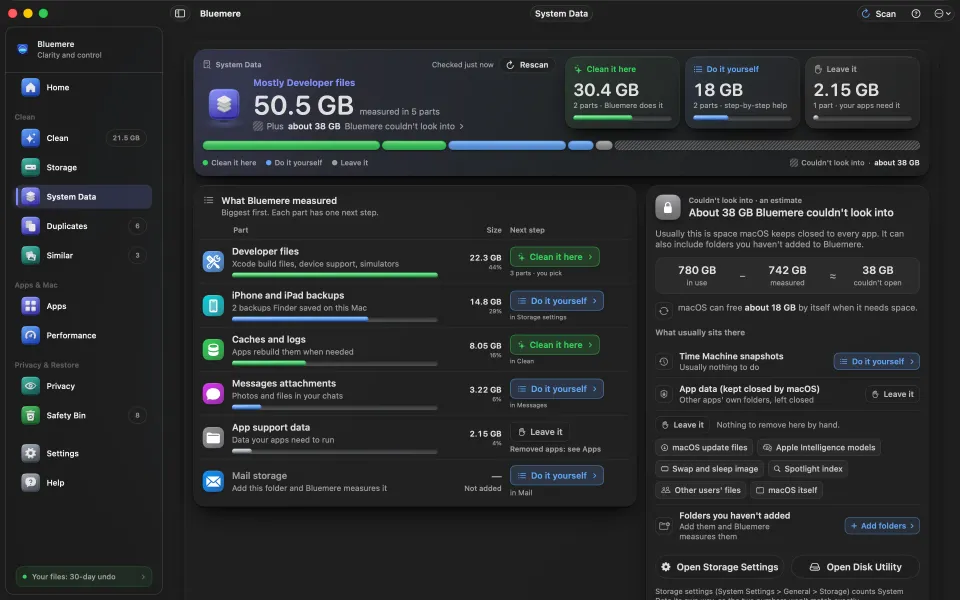
Bluemere will measure the parts of System Data it can read and tell you how much it cannot look into, instead of guessing.
Free space, counted honestly
Bluemere will show two numbers and name each one: what is free right now, and what is available, which adds the space macOS frees by itself when needed. After each clean, it will measure both again.
What Bluemere will find
Caches, logs and old downloads. Exact duplicates and similar photos in your folders. Apps with their leftovers (just drag an app onto the window), and leftovers of apps you already deleted. Developer files such as Xcode build files, simulators and package caches.
No internet access
Bluemere will have no network permission, and macOS enforces that. No account, no ads, no data collected. Bluemere will see only the folders you approve and what macOS lets every app read.
A look inside the app
How it works
Step 1: Approve your folders
On first launch, you’ll choose the folders Bluemere may read in the macOS open panel. Outside them, it will see only what macOS lets every app read, such as which apps are running.
Step 2: Scan and review
A scan will show what takes up space: the storage map, System Data, duplicates, similar photos, and apps with their leftovers. Each suggestion will be marked Safe or Review first.
Step 3: Clean, and restore if you need to
Your own files will move to the Safety Bin. Bluemere will measure free space before and after each clean, so you see what really came back. If you change your mind, you’ll restore the file to the same place.
Free or available? Why your Mac shows two numbers for its disk
Ask your Mac how much space is left and it has two answers. Free right now is the space nothing uses at this moment. Available, the number Finder shows, adds the space macOS can free by itself when something needs it: for example local copies of iCloud files, caches and snapshots that macOS manages.
Some apps look only at the space that is free right now, so an update or a large download can say the disk is full while Finder shows plenty of room. No app can free the space macOS manages for you; macOS frees it itself when something needs the room.
Bluemere will show both numbers, name each one, and split the whole disk into parts that add up exactly to its size. After each clean, it will measure both numbers again, so you see what really came back.
The three numbers in Bluemere
- Free right now—space no file uses at this moment
- macOS can free by itself—space macOS releases when something needs it
- Available—both together, the number Finder shows
What Bluemere reads stays on your Mac
In plain words: how the app handles your data.
Read the privacy policy- Bluemere will have no network permission: macOS enforces that the app cannot connect to the internet. No account, no ads, no analytics, and we collect no data through the app.
- Bluemere will read only the folders you approve in the macOS open panel, plus what macOS lets every app read, such as which apps are running and how busy the Mac is. Everything the app reads stays on your Mac.
- Files you remove will go to the Safety Bin: a folder in the app’s own storage area on your Mac. From there you’ll be able to restore them for 7, 14 or 30 days.
- Purchases will be handled by Apple. The optional explanation of what an item is will use Apple’s on-device model where macOS offers it. Spotlight search for items in the Safety Bin will be off until you turn it on. The weekly check will only notify you, with a local notification.
- We only receive personal data if you email us.
Frequently asked questions
Can’t find your question? Write to us—we reply personally.
Visit the support pageWhen can I get Bluemere?
Bluemere isn’t on the Mac App Store yet. Once it is, the link will appear right here on this page. If you’d like a one-time heads-up at launch, send us a short email.
Which devices will Bluemere run on?
Bluemere is made for the Mac and will require macOS 15 or later. There is no iPhone or iPad version.
What will happen to the files I remove?
Your own files—duplicates, large files, similar photos, uninstalled apps and their leftovers—will move to the Safety Bin. From there you’ll be able to restore them to the same place for 7, 14 or 30 days.
Caches and logs that apps rebuild will be removed after one confirmation that says so. Caches of open apps, and caches in use right now, will be skipped.
Will Bluemere connect to the internet?
No. Bluemere will have no network permission, and macOS enforces that: the app cannot connect to the internet. There will be no account, no ads and no data collected.
Will Bluemere make my Mac faster or more secure?
Bluemere will free disk space. It makes no promises about security or performance. It will not change system files, and it will not move Safari, Mail or Messages data; for those it will show the steps macOS offers.
Will Bluemere be a subscription?
No, it won’t. Bluemere Pro is planned as a one-time purchase that removes the monthly limit. Without Pro, you’ll be able to scan everything and clean up to 2 GB a month. We’ll share the price at launch.
Which languages will Bluemere come in?
In ten languages: English, German, French, Spanish, Italian, Portuguese (Brazil), Dutch, Japanese, Simplified Chinese and Korean. The optional explanation of what an item is will be in English only: on macOS 26 or later with Apple Intelligence turned on, when Bluemere runs in English.
Questions or feedback?
Questions or ideas about Bluemere? Write to us—we read every message ourselves and reply, usually within two business days.
Coming soonBluemere
A storage cleaner for the Mac, with a way back for your files.
A short email is all it takes—we’ll write once when it launches. No newsletter. Privacy notice